Professional · Tools · New
Professional Fee
Invoicing Tool
Are you a professional who knows how much you really want to take home? This Excel sheet works the usual process backwards: enter the net amount you want to receive and get the taxable amount to show on your invoice, with pension-fund contribution, VAT, withholding tax and exempt amounts already worked out. No more trial and error. The sheet follows Italian invoicing rules and its labels are in Italian.
— by Alessandro Moschini
Published November 3, 2026
Complete your purchase - €15.00
Thank you! Here's how to complete your payment
We've registered you as . Once we receive payment confirmation, we'll email you the Excel file.
Click the button to open PayPal's secure page (it opens in a new tab). The amount and description are already filled in: you can pay with your PayPal account or, as a guest, with a debit or credit card.
What the tool does
- From net to taxable amount. Enter the net you want to receive: the sheet works out the amount to invoice, with and without withholding tax.
- Every invoice line. Pension-fund contribution, VAT base, VAT, exempt amounts, invoice total and withholding, line by line.
- Three worksheets.
• “Netto pagato al professionista” (start from what you want the client to pay you)
• “Totale fattura desiderato” (start from the all-inclusive total)
• “Netto effettivo” (start from what you want to keep, after passing on the pension fund and VAT). - Your rates, always. Withholding and pension-fund rates are cells you fill in, not values fixed inside the formulas: if rates change, just update them.
- Excel or LibreOffice. You receive an .xlsx file: yellow cells with blue text are the ones to fill in, everything else calculates itself.
An example
Net to receive €30.00, exempt amounts €10.00, VAT 22%, withholding 20%, pension fund 4% (purely illustrative figures):
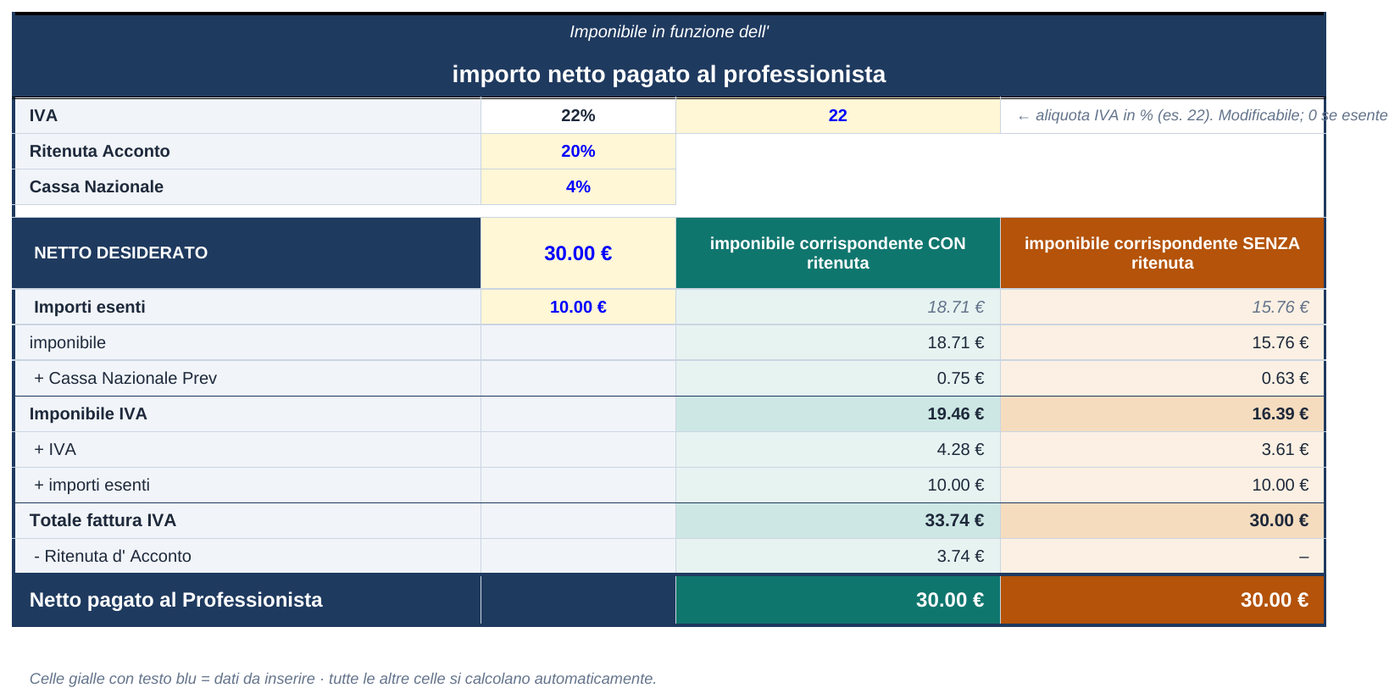
| Taxable amount | 18.71 |
| + Pension fund 4% | 0.75 |
| VAT base | 19.46 |
| + VAT 22% | 4.28 |
| + Exempt amounts | 10.00 |
| Invoice total | 33.74 |
| − Withholding tax 20% | 3.74 |
| Net paid to the professional | 30.00 |
The net comes back to €30.00 to the cent. The tool is a calculation aid: always check the pension-fund, surcharge and withholding treatment that applies to your case. It does not replace tax advice.
How it works
- Fill in the form with your name and email.
- Confirm the payment: PayPal's secure page opens, where you can also pay by card without an account.
- Receive the Excel file by email as soon as the payment is verified.
Frequently asked questions
Who is this tool for?
For anyone who issues fee invoices and wants to start from the amount they really intend to receive instead of calculating backwards: freelance professionals, firms and the staff who support them.
What if the rates change?
Nothing to redo: withholding tax and pension-fund rates are data you enter in the yellow cells. If an item does not apply to your case, set it to zero.
How do I get the file?
After paying with PayPal you receive the Excel file (.xlsx) by email as an attachment.
Which programs does it work with?
Microsoft Excel and LibreOffice Calc. The sheet labels are in Italian and the calculations follow Italian invoicing.
Complete your purchase - €15.00
Thank you! Here's how to complete your payment
We've registered you as . Once we receive payment confirmation, we'll email you the Excel file.
Click the button to open PayPal's secure page (it opens in a new tab). The amount and description are already filled in: you can pay with your PayPal account or, as a guest, with a debit or credit card.
Questions? Email alessandro.moschini.studio@gmail.com.